Last updated: 2026-09-01
Why this matters: In the hospitality industry, traditional accounting is too slow. Waiting until the 20th of next month for an accountant's profit-and-loss statement means you are driving looking only in the rearview mirror — if food costs spiked or platform commissions eroded your margins during the first week of the month, you discover it thirty days too late to fix it. Culizen provides an executive Profit & Loss statement updated in real time as invoices arrive and daily sales sync.
The Real-Time Financial Statement
The Financials view combines live invoice purchases, recipe food costs, sales revenue, and overhead expenses into a clean, operational P&L:
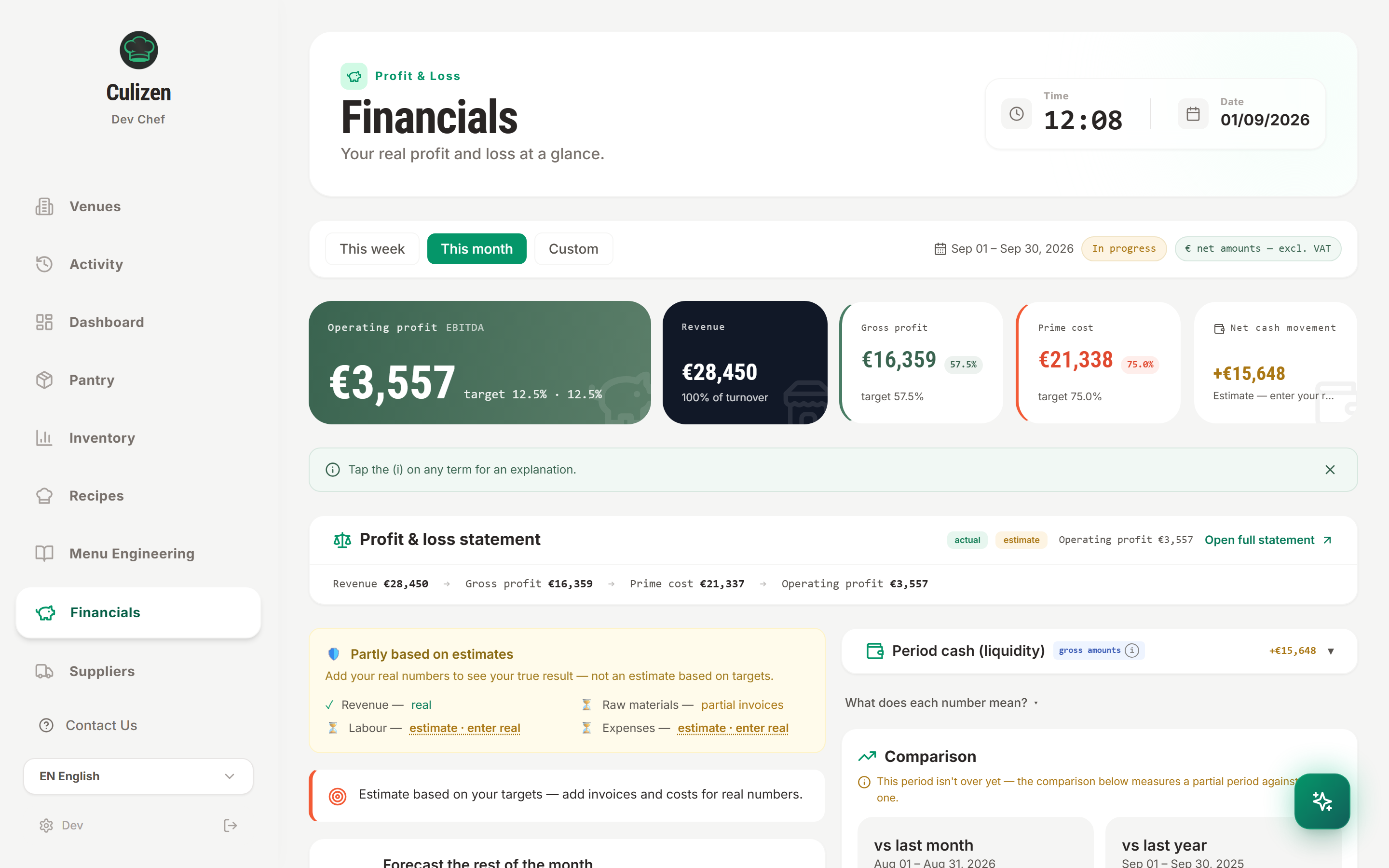
You can filter results across This week, This month, or a Custom date range. All figures are shown net of VAT.
How Culizen Computes Your Numbers
1. Net Revenue
- Ingested automatically from your POS via the Sales API, Delivery Manager, or W-POS.
- Alternatively, enter total revenue manually using Add your first revenue or tap Pull revenue from POS.
- Categorized across service channels: Dine-in, Takeaway, In-house Delivery, and Platform Delivery.
2. Cost of Goods Sold (COGS)
- Calculated directly from your approved supplier invoices within the selected date range.
- Unlike estimated spreadsheet models, Culizen uses actual invoice sums and credit notes to give you the true expenditure on food, beverages, and consumables.
- Displays your current Food Cost %: $\text{Food Cost %} = \left(\frac{\text{COGS (Food & Beverage)}}{\text{Net Revenue}}\right) \times 100$
3. Gross Profit
$\text{Gross Profit} = \text{Net Revenue} - \text{COGS}$
This represents the funds available to cover labor, occupancy, utilities, and deliver bottom-line profit.
4. Operating Expenses & Targets
Configure your fixed and variable operational expenses in Settings → Expense Targets:
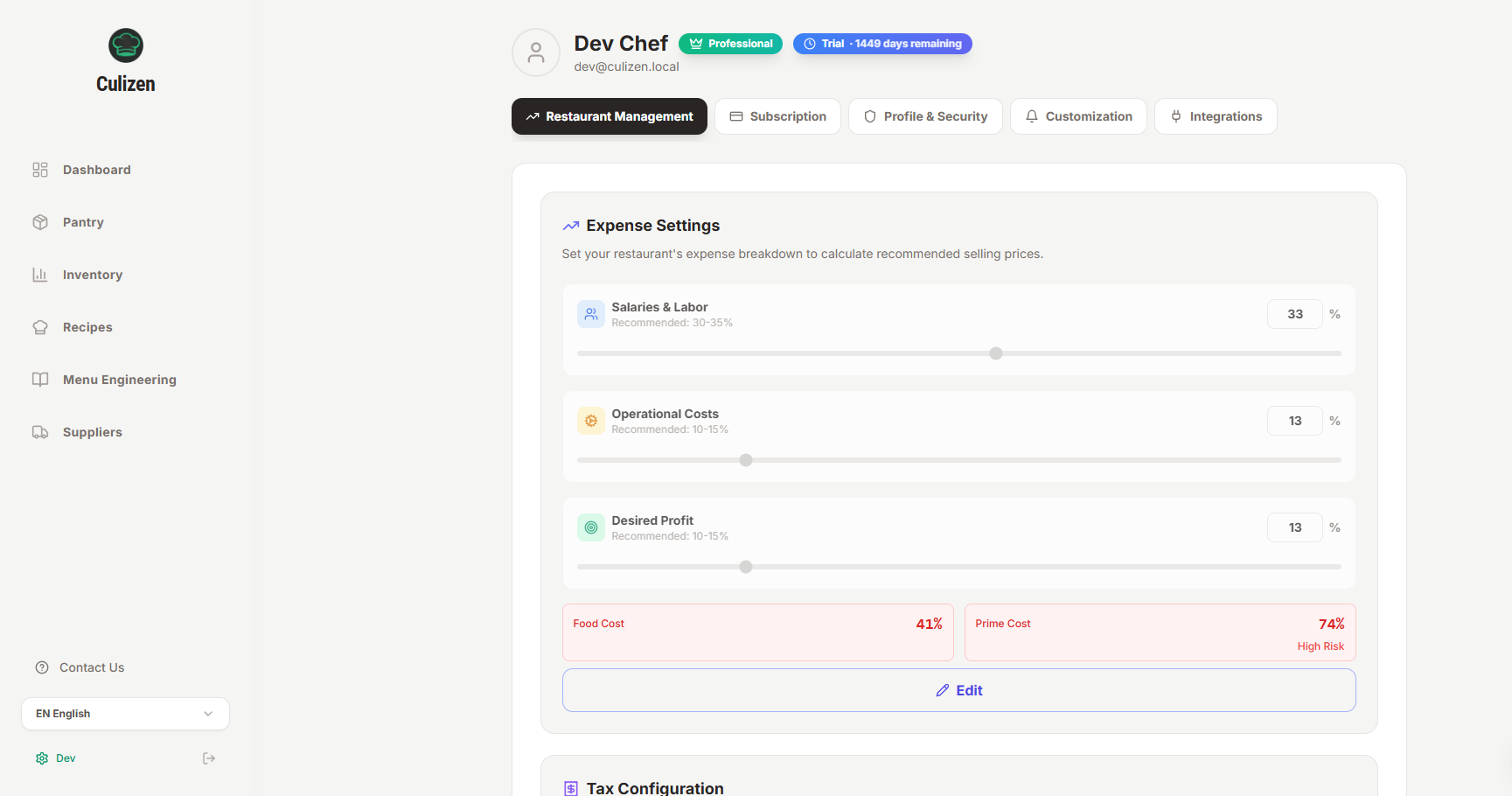
- Labor & Payroll: Kitchen staff, service team, management wages.
- Occupancy & Rent: Fixed commercial rent and property fees.
- Utilities & Operations: Electricity, gas, water, POS software, maintenance.
- Marketing & Delivery: Delivery app blended commission deductions and local promotions.
The Golden Rule: Tracking Prime Cost
The single most critical health metric in restaurant management is Prime Cost:
$\text{Prime Cost} = \text{COGS (Food & Beverage)} + \text{Total Labor Cost}$
| Prime Cost % | Operational Assessment | Action Required |
|---|---|---|
| Below 55% | Highly efficient, high-profit operations | Maintain standards, invest in staff retention |
| 55% – 65% | Industry healthy benchmark range | Ideal operating sweet spot for full-service & casual dining |
| 65% – 70% | Margin squeeze zone | Review high-cost recipe ingredients and overtime scheduling |
| Above 70% | Critical danger zone — burning cash | Immediate recipe repricing, menu re-engineering, and labor optimization required |
Culizen monitors your Prime Cost continuously and highlights alerts if your expense targets predate current benchmarks (such as the 42.5% food cost ceiling warning).
Closing the Books: Monthly Review Routine
At the end of each fiscal month, follow this 3-step checklist:
- Verify Invoices: Check Suppliers to make sure all delivery notes have been converted to approved invoices and credit notes have been registered.
- Reconcile Stock: Complete an end-of-month stock take in Inventory to adjust for on-hand inventory fluctuations.
- Review Culizen Advisor: Inspect the financial insights widget on your Dashboard to see recommended menu price adjustments and savings opportunities before printing next month's menu.